
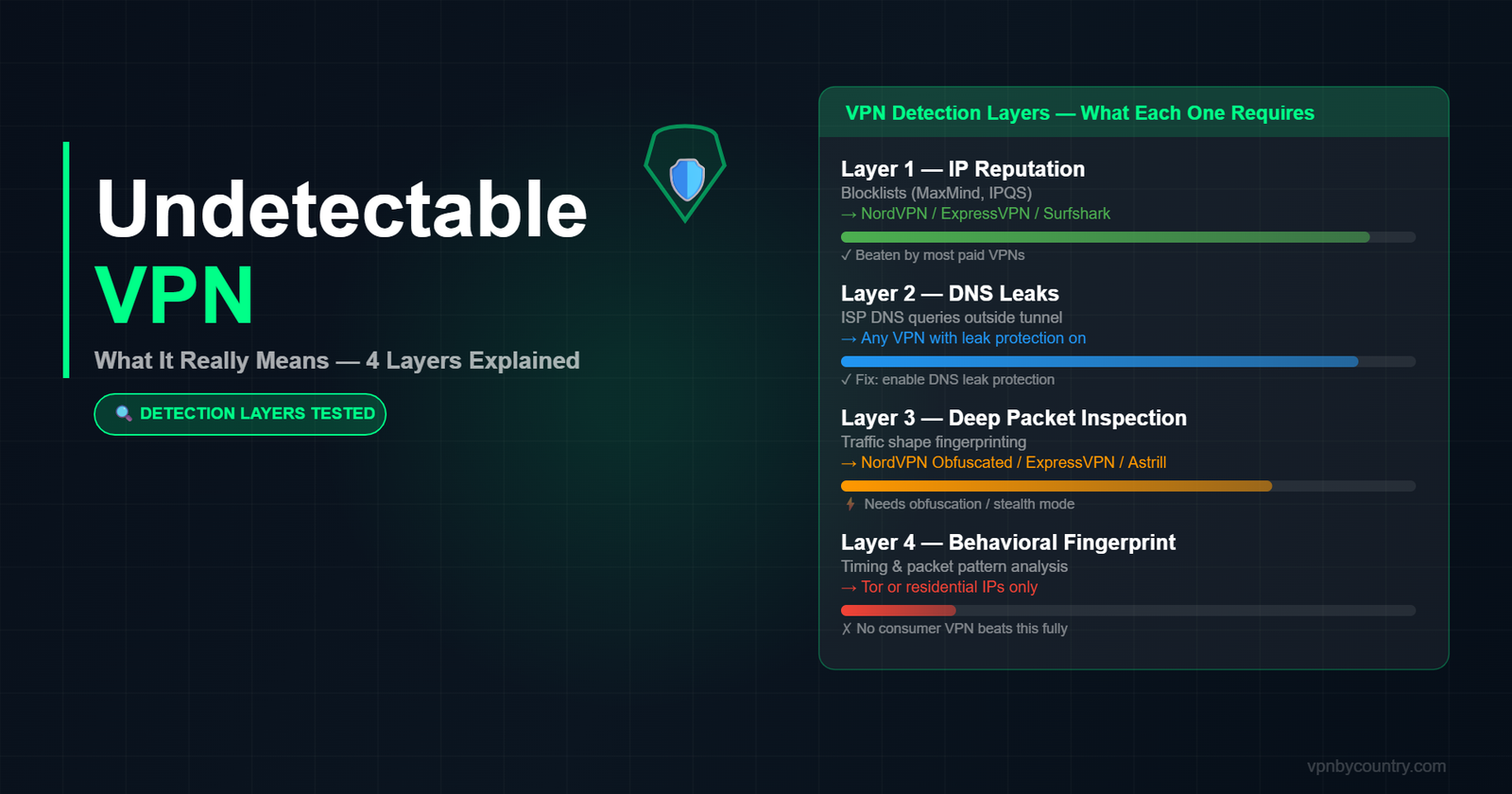
Every VPN marketing page uses the word “undetectable.” Almost none of them explain what that actually means — or which detection method they are actually defeating. After spending time testing VPN behavior across streaming platforms, corporate firewalls, school networks, and deep-packet inspection tools, here is what I found: there is no single thing called “undetectable.” There are four separate detection layers, and most VPNs only beat one or two of them.
This article breaks down each layer, tells you which VPNs beat which ones, and explains what you actually need depending on your situation — not a ranked list, but a technical map so you can make the right call yourself.
The four ways VPN traffic gets detected
Before picking a VPN, you need to know which of these four detection systems you are actually up against. Getting them confused is how people end up buying the wrong tool.
Layer 1: IP reputation checks
This is the most basic and the most common. Services like Netflix, Hulu, and banking apps maintain blocklists of known VPN IP ranges. When you connect through a VPN server, your traffic arrives from a data center IP — and those IPs get added to commercial blocklists like MaxMind, IPinfo, and IPQS. The site checks your IP against that list. Match found: blocked.
What beats this: residential IPs or regularly rotated IPs that have not been flagged yet. NordVPN, ExpressVPN, and Surfshark maintain large enough IP pools that they stay ahead of most blocklists. Mullvad and ProtonVPN are slower to rotate, which is why they struggle with streaming. Private Internet Access (PIA) uses a particularly large server fleet that dilutes IP reputation risk.
Layer 2: DNS leak detection
Your device sends DNS queries — essentially the lookup that translates “netflix.com” into an IP address — before the VPN tunnel is fully established, or through a separate channel that bypasses the tunnel entirely. If those queries go through your ISP’s resolver instead of the VPN’s, the ISP (and any firewall in the middle) can see exactly what sites you are visiting even though your traffic appears encrypted.
What beats this: a VPN with forced DNS through the tunnel, DNS leak protection enabled, and IPv6 leak protection turned on. All major paid VPNs handle this now. The failure mode is usually misconfiguration — split tunneling enabled by default, or the kill switch turned off. Always verify at dnsleaktest.com after connecting.
Layer 3: Deep packet inspection (DPI)
This is the layer that matters on corporate networks, school Wi-Fi, and in countries like China, Iran, and Russia. DPI does not look at your IP — it looks at the shape of your traffic. Standard OpenVPN over port 1194 has a recognizable signature. So does WireGuard. A DPI firewall can identify these patterns and block the connection without caring where it is going.
What beats this: obfuscation, also called stealth mode, camouflage mode, or traffic obfuscation depending on the provider. This wraps VPN traffic in a disguise that looks like regular HTTPS. ExpressVPN uses Lightway with obfuscation. NordVPN has obfuscated servers (different from standard servers — you have to enable them). Astrill has a dedicated StealthVPN protocol. Shadowsocks-based providers like Outline are specifically designed for DPI evasion. Note: obfuscated servers are slower. If you do not actually face DPI, you are paying a speed penalty for nothing.
Layer 4: Behavioral fingerprinting
This is the hardest to beat and the one almost no VPN marketing mentions. Even if your IP is clean and your traffic looks like HTTPS, advanced detection systems can analyze your connection behavior — timing patterns, packet size distribution, handshake characteristics — and identify it as VPN traffic with high confidence. Google, Cloudflare, and some financial institutions use this for fraud scoring.
What beats this: residential proxy routing (not traditional VPN), WireGuard-based protocols with randomized handshake timing, or Tor-over-VPN for maximum obfuscation. No mainstream VPN fully defeats this layer consistently. If you are facing behavioral fingerprinting, you are dealing with a very sophisticated adversary and a VPN alone is probably not your solution.
The Most Undetectable VPN in 2026
NordVPN’s NordWhisper protocol and obfuscated servers disguise VPN traffic as regular HTTPS — invisible to DPI.
Get NordVPN — From $3.39/mo →Match your threat to the right tool
Here is the honest mapping — based on what you are actually trying to do, not a generic “best VPN” ranking:
You want to unblock Netflix, streaming, or geo-restricted content
Your threat is Layer 1 (IP reputation). You need a VPN with frequently rotated IPs and dedicated streaming servers. ExpressVPN and NordVPN consistently beat Netflix, Disney+, BBC iPlayer, and most regional streaming. Surfshark is close behind. Stay away from providers that have not updated their IP pools — Windscribe and TunnelBear work some of the time but not reliably.
You are on school or workplace Wi-Fi
Your threat is Layer 3 (DPI). The network admin almost certainly runs a DPI-capable firewall. Standard VPN protocols will be blocked. You specifically need a VPN with obfuscation enabled and the ability to run over port 443 (the standard HTTPS port, which is almost never blocked). NordVPN obfuscated servers, ExpressVPN Lightway, and Astrill VPN StealthVPN are the practical options. Enable the kill switch so your real traffic does not leak if the obfuscated tunnel drops.
You are in a country with censorship (China, Iran, Russia, UAE)
Your threat is Layer 3 with state-level enforcement, which means more aggressive DPI and IP-range blocking than corporate firewalls. Astrill VPN is the most reliable for China specifically because it actively maintains StealthVPN for the Chinese market. ExpressVPN Lightway works for many users but is less consistent in Beijing vs. Shanghai. For Iran and Russia, Outline (Shadowsocks-based, free) and Lantern are worth considering alongside commercial options. See our full China VPN guide for tested configurations.
You want privacy from your ISP or government surveillance
Your threat is Layers 1 and 2 primarily. Any reputable paid VPN with a verified no-logs policy handles this adequately. The differentiation is the audit. Mullvad has been audited by Cure53 and actually had its servers physically seized by police — who found nothing because the logs did not exist. ProtonVPN is Switzerland-based with strong legal protections. ExpressVPN’s Lightway code is open source. These matter more than marketing claims.
The “100% undetectable” lie
No VPN is 100% undetectable across all four layers. Any provider claiming otherwise is either lying or using a definition of “undetectable” narrow enough to be meaningless (for example: “our VPN is undetectable by basic IP checks” — which every VPN passes). The honest answer is:
- Layers 1 and 2 (IP + DNS): beaten by virtually every paid VPN if properly configured
- Layer 3 (DPI): beaten by VPNs with genuine obfuscation — ExpressVPN, NordVPN obfuscated, Astrill, Shadowsocks-based tools
- Layer 4 (behavioral fingerprinting): not reliably beaten by any mainstream consumer VPN
If you are trying to hide from a state-level adversary using Layer 4 analysis, you need Tor, not a VPN. If you are trying to watch the US version of Netflix from abroad, you need a good Layer 1 solution and almost nothing else.
What actually makes a VPN “hard to detect” in practice
Setting marketing aside, here is the checklist that meaningfully reduces VPN detectability across the layers that most people actually encounter:
- Use WireGuard or a proprietary protocol (not OpenVPN/IKEv2). WireGuard has a smaller, harder-to-fingerprint packet signature. ExpressVPN’s Lightway and NordVPN’s NordLynx are both WireGuard derivatives with additional hardening.
- Enable obfuscation only when you actually need it. Leaving obfuscation on permanently slows your connection unnecessarily. Most VPN apps let you toggle “stealth” or “obfuscated” mode per network.
- Use port 443 or port 80. These ports carry standard web traffic and are essentially never blocked. Most VPNs let you specify the port. Port 1194 (default OpenVPN) is the first thing DPI firewalls block.
- Kill switch on, always. The window between a VPN tunnel dropping and reconnecting can expose your real IP for several seconds. That is enough for a site to log it.
- Disable IPv6 at the OS level if your VPN does not handle it. Many VPNs still have IPv6 leak vulnerabilities. Check your VPN settings and, if in doubt, disable IPv6 in your network adapter settings.
- Run a leak test after every connection. Not just the first time you set up the VPN — every time you switch servers or networks. browserleaks.com covers IP, WebRTC, DNS, and canvas fingerprint in one page.
The residential IP option
One tool that genuinely beats Layer 1 detection more reliably than data center VPNs is a residential proxy or residential IP VPN. These route your traffic through IPs assigned to actual home internet connections, which appear to blocklists as regular users. Services like Mysterium Network (decentralized), IPRoyal, and Bright Data offer residential IPs. The tradeoff: they are slower, more expensive, and often sold per-gigabyte rather than flat-rate. For heavy streaming or downloading, a traditional VPN is more practical. For one-off access where the IP reputation check is the primary problem, residential IPs work when nothing else does.
Quick reference: which VPN for which detection layer
To wrap up: the right answer depends on your situation. For streaming geo-blocks, NordVPN or ExpressVPN with standard WireGuard. For school or work DPI firewalls, NordVPN obfuscated or ExpressVPN Lightway over port 443. For China and high-censorship countries, Astrill StealthVPN or ExpressVPN with obfuscation pre-installed before you arrive. For maximum privacy with verified no-logs, Mullvad or ProtonVPN. For situations where data center IPs keep failing, look at residential IP solutions as a complement, not a replacement.
The phrase “undetectable VPN” is a shortcut that collapses four different technical problems into one word. Now that you know which problem you are actually solving, you can pick the right tool rather than buying the one with the best marketing.
Related reading: Best VPN for China — tested inside the Great Firewall | VPN for restricted and blocked sites | Best VPN for Rainbet — bypassing geo-locks on crypto casinos
FAQ
Can a VPN be truly undetectable?
No. Every VPN leaves some detectable trace at some layer. “Undetectable” in practice means it defeats the specific detection method used by the platform or network you are targeting. Most commercial VPNs defeat IP reputation checks and DNS leaks reliably. Fewer defeat deep packet inspection. None consistently defeat behavioral fingerprinting at the OS level.
What is the most undetectable VPN for school or work?
For DPI-based firewalls on school and corporate networks, NordVPN with obfuscated servers enabled, or ExpressVPN using Lightway protocol over port 443, are the most consistently effective options. Both disguise VPN traffic as standard HTTPS, which is the traffic type least likely to be blocked.
Does WireGuard make a VPN harder to detect?
Yes and no. Raw WireGuard has a distinct packet signature that advanced DPI systems can identify. However, WireGuard derivatives like NordLynx and Lightway add obfuscation layers on top, making them significantly harder to fingerprint than standard OpenVPN. For most detection scenarios, WireGuard-based protocols are the better choice.
Will a free VPN be undetectable?
Almost certainly not. Free VPNs use shared IP pools that get flagged quickly, lack obfuscation, often have DNS leaks, and rarely maintain the server infrastructure needed to stay ahead of IP blocklists. If detection avoidance matters to you, a free VPN is not the tool.
Is using an undetectable VPN legal?
Using a VPN is legal in most countries. In countries like China, Russia, and UAE, only government-approved VPNs are technically legal — though enforcement against individual users is rare and targeted. Using a VPN to bypass a service’s terms of service (geo-restrictions) violates those terms but is not a criminal act in most jurisdictions.
🛡 Get a Truly Undetectable VPN
These VPNs use obfuscated protocols to defeat DPI, firewalls, and network detection. Try risk-free.
🚀 ExpressVPN 🔒 NordVPN 🔐 ProtonVPN